
PlaybookHow to implement a (mostly) Contacts-only strategy in Salesforce
This playbook is designed to be a step-by-step guide on how to implement a Contacts-only strategy in Salesforce. Note that this playbook is the most efficient and simplistic way to go Contacts-only, but you may want/need to tweak different areas of the playbook to accommodate any unique requirements for your company.
Quick overview of the solution with examples
As to not waste your time, I want to provide a quick overview of our recommended solution to move to a Contacts-only strategy in Salesforce.
Why implement a Contacts-only strategy in Salesforce?
If you are reading this playbook, you are most likely already sold on the idea of Contacts-only, but here are some of the most common reasons:
- It simplifies a lot of the views/processes for sales
- It dramatically simplifies reporting
- It solves most ownership/routing challenges
- It sets you up to execute an account-based marketing/sales strategy
Why hasn't Contacts-only historically been the standard for B2B companies?
Good question. You have seen companies implement a Contacts-only strategy, but historically it has been somewhat manual and it has come with custom development work and some tradeoffs. We think with the following trends (and this playbook), a Contacts-only strategy will simply become the standard going forward. These trends are the following:
- It is now cost-effective and easy to implement
- Speed to follow-up by sales is no longer compromised
- Quality data enrichment tools are now more widely adopted
- Account-based marketing (ABM) is becoming more widely adopted
- GTM operations talent has dramatically improved and has the ability to execute a Contacts-only strategy
Does the strategy outlined in this playbook skip and/or eliminate the Lead object in Salesforce?
No. We are big believers that all prospects entering Salesforce should still start as a Lead and that the Lead object should still be used for two purposes:
- Prospects with a business email address that do not meet your company's definition of an Ideal Customer Profile (ICP)
- Prospects with a personal email address that could not be matched to an existing Account
Some have referred to the Lead object being used in this way as a Lead "graveyard" or a Lead "holding tank". The idea is that we shouldn't create Accounts/Contacts for everything since we will simply end up with a bunch of "junk" Accounts. Prospects will stay as a Lead until they are enriched to match an existing Account and/or meet the ICP in which case they will get converted to a Contact/Account.
Steps to Implement the Playbook
We've kept this playbook as easy to implement as possible. We are going to break it down into the following 3 steps:
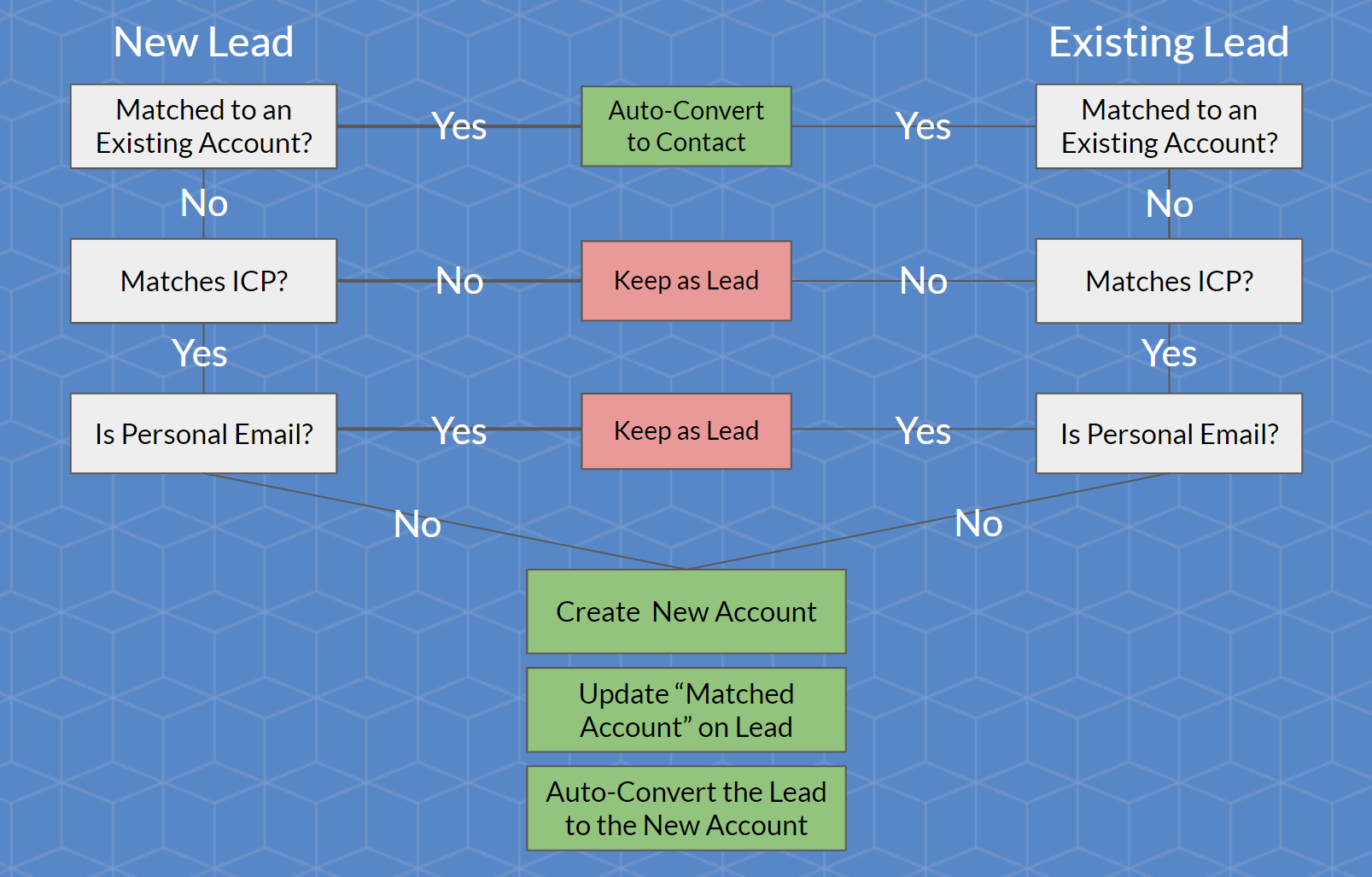
- Implement lead-to-account matching for net new Leads (real-time) and existing Leads (scheduled)
- Implement a Salesforce flow to auto-convert matched Leads
- Implement a Salesforce flow to auto-create Accounts
If you are a visual person, here's a flow diagram based on the various decisions and actions we will be implementing.
Let's get started!
Step #1: Implement lead-to-account matching for net new Leads (real-time) and existing Leads (scheduled)
Step #2: Implement a Salesforce flow to auto-convert matched Leads
Step #3: Implement a Salesforce flow to auto-create Accounts
Ready to take the next step?Request a demo today.
We will follow-up with you shortly to schedule a day/time that works for you and your team.
Request a Demo